
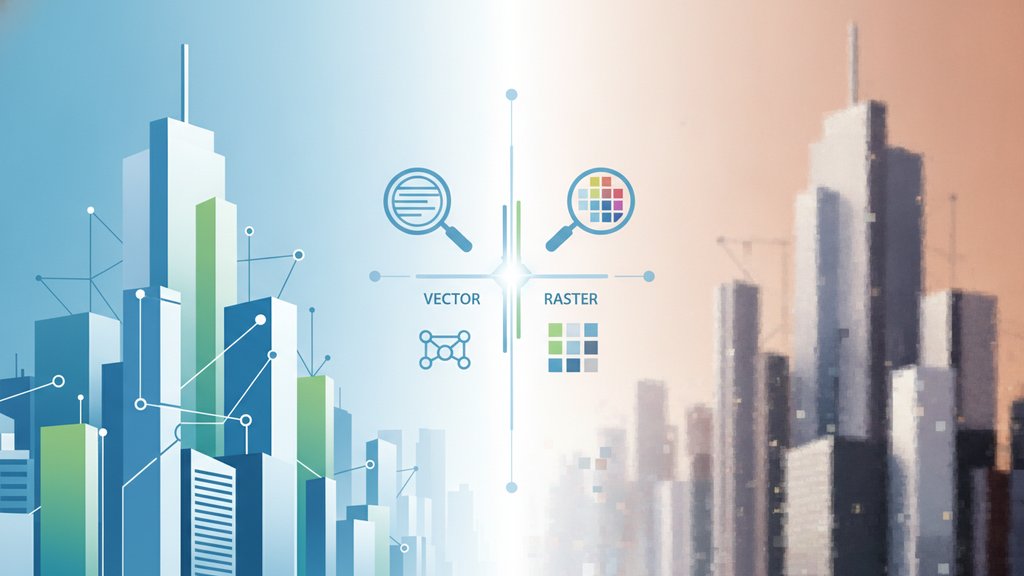
The core difference is simple: vector images are made of math (points, lines, and curves) so they scale to any size without blur, while raster images are made of a fixed grid of colored pixels that lose sharpness when you enlarge them. Use vectors for logos, icons, and illustrations that need to resize freely; use raster for photographs and anything with rich, detailed color like a phone snapshot. That single rule handles most of the vector vs raster images decisions you'll ever face.
Content Table
What Vector and Raster Actually Mean
A raster image stores a rectangular grid of pixels. Each pixel holds a color value, and the picture only exists at that fixed resolution. A 1920×1080 photo has exactly 2,073,600 pixels, no more. Zoom past 100% and you're just stretching those same pixels bigger, which is why edges turn blocky or fuzzy. Common raster formats include JPG, PNG, WebP, and GIF.
A vector image stores instructions instead of pixels: "draw a circle here with this radius, fill it blue." The rendering software recalculates those shapes at whatever size you request, so a vector logo looks razor-sharp on a business card or a billboard from the same file. SVG is the dominant web vector format; AI, EPS, and PDF also carry vector data.
The Key Differences at a Glance
| Property | Vector | Raster |
|---|---|---|
| Built from | Math (paths, points, curves) | Fixed grid of pixels |
| Scalability | Infinite, no quality loss | Limited by resolution |
| Best for | Logos, icons, type, illustration | Photos, complex color, texture |
| File size | Tiny for simple art | Grows with resolution |
| Editable | Reshape any element freely | Pixel-level edits only |
| Formats | SVG, AI, EPS, PDF | JPG, PNG, WebP, GIF |
The word that separates them is scalability. A vector's file size depends on how many shapes it contains, not how big you display it. A raster's quality depends on raster resolution, the number of pixels packed into it, so bigger displays demand bigger files.
When to Use Vector Graphics
Reach for vector graphics whenever the same artwork needs to appear at wildly different sizes or must stay perfectly crisp:
- Logos and brand marks: one file works for a favicon and a truck wrap.
- Icons and UI elements: SVG icons stay sharp on any screen density, including Retina displays.
- Typography and lettering: text stays selectable and clean at any zoom.
- Charts, diagrams, and maps: lines and labels never pixelate.
- Print work: signage, packaging, and cutting machines all prefer vector paths.
Vectors also compress beautifully. A simple SVG icon can be under 2 KB, and since it's just text-based markup, you can even edit its colors in a code editor.
When to Use Raster Images
Raster wins anytime an image has continuous tones, subtle shading, or real-world detail that math can't cleanly describe:
- Photographs: millions of unique pixel colors can't be reduced to shapes.
- Detailed digital paintings: texture and brushwork live at the pixel level.
- Screenshots: you're literally capturing a pixel grid.
- Social media posts: platforms expect fixed-dimension JPG or PNG files. Our guide on adjusting images for social media covers the exact sizes.
The trade-off is that enlarging raster past its native resolution degrades it. If you need to shrink or grow raster images while keeping them clean, see how to resize images without losing quality. Compression choices matter too: our breakdown of lossy vs lossless compression explains when JPG's file-shrinking is worth the quality cost.
Choosing Between SVG and PNG
Pick SVG for logos, icons, and flat illustrations that need to scale cleanly, and pick PNG for screenshots or detailed artwork that still needs transparency. For a full side-by-side comparison, read our guide on PNG vs SVG.
Converting Between the Two
Converting raster to vector means tracing pixels into paths. It works well for simple, high-contrast art like a black-and-white logo, but a detailed photo will never trace cleanly into usable vector shapes. Automated tracing tools guess at edges and produce messy results on complex images.
Going the other way, vector to raster (called rasterizing), is easy and lossless as long as you export at a high enough resolution. This is exactly what happens every time an SVG is displayed on screen or a logo gets placed in a JPG banner. Always export vectors at the largest size you'll need, since you can shrink a raster but not grow it back.

Switch between raster formats in seconds
Once you've settled the vector vs raster images question, our free image converter turns your PNG, JPG, WebP, and GIF files into the exact raster format you need, right in the browser.
Convert your image →
JPG is a raster format. It stores a fixed grid of pixels, which is why enlarging a JPG past its native size makes it blurry or blocky. It's built for photographs and complex color, not for artwork that needs to scale to many sizes.
Technically yes, but the result is usually poor. Photos contain millions of subtle color transitions that tracing tools can't cleanly turn into shapes. Vectorizing works best on simple, high-contrast art like logos or line drawings, not detailed photographs.
A logo appears everywhere: tiny favicons, business cards, websites, and giant billboards. A vector logo scales to any of those sizes from one file without losing sharpness. A raster logo would need a separate high-resolution file for each size and still risk pixelation.
For flat icons and logos SVG is usually smaller; for photos or very detailed art PNG is. See PNG vs SVG for real file-size numbers.
No. Vector images have no fixed resolution because they're defined by math, not pixels. They render sharply at any size on any screen. Resolution only matters for raster images, where more pixels mean more detail but also a larger file size.