Meme templates are the reusable image frames that give memes their recognizable structure: a specific background image paired with defined spots where text goes. They work because the format itself carries meaning before you even read the words, which is exactly what makes them so effective for humor, commentary, and yes, marketing.
Content Table
What Is a Meme Template
A meme template is a blank or semi-blank image that has an established cultural meaning. Think of it like a joke setup that the Internet already knows. The template provides the punchline structure; you just fill in the specifics. The image of a guy in a burning room calmly drinking coffee, for example, instantly signals "ignoring a problem." That context is baked into the template itself.
Templates come in three broad flavors:
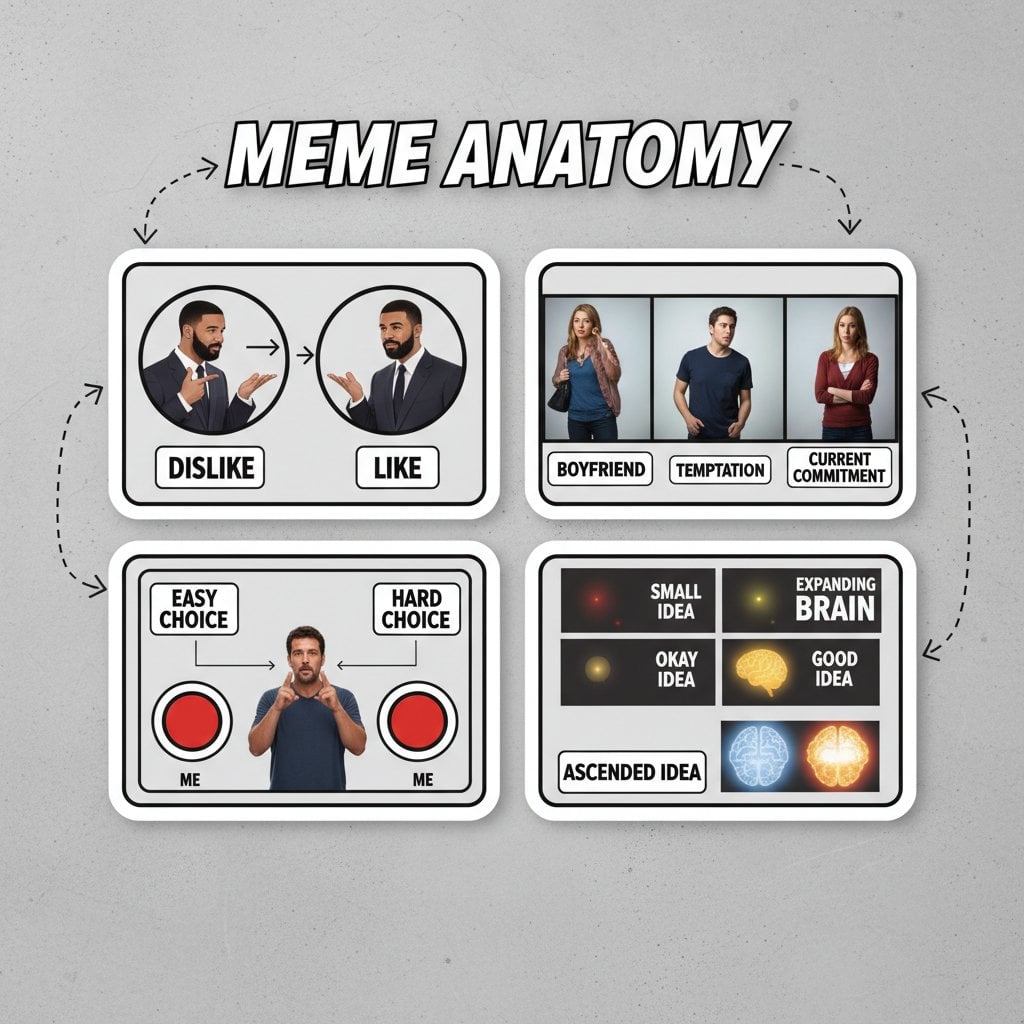
- Built-in classics: Widely recognized images that have been circulating for years, like Drake Pointing, Distracted Boyfriend, or Two Buttons.
- Community-published templates: Newer or niche formats that users have uploaded and shared on meme platforms.
- Custom images: Any image you upload yourself to use as a one-off template, useful when you want a fresh format tied to a very specific moment or inside joke.
Anatomy of a Meme
Understanding meme anatomy helps you use templates more intentionally. Every meme has a few core components:
- Background image: The visual that carries the emotional or situational context. This is the template itself.
- Text boxes: Defined regions on the image where captions go. Most classic templates have 2 boxes (a top and a bottom, or two labeled characters). Some formats have 3 or more.
- Caption text: The words you write. These do the heavy lifting of making the meme specific and funny or relatable.
- Text style: Font choice, size, color, and outline. Impact font with a white fill and black stroke is the canonical meme look, but modern memes use a much wider range of styles.
Common Meme Formats and Layouts
Meme formats are the recurring structural patterns that define how a template communicates. Here are the most widely used ones:
| Format | Layout | Best Used For |
|---|---|---|
| Top/Bottom Caption | One text box at top, one at bottom | Setup and punchline, expectation vs. reality |
| Labeled Reaction | Labels overlaid on characters or objects in the scene | Comparisons, relatable choices (Two Buttons, Drake) |
| Panel Strip | 2-4 side-by-side or stacked panels | Escalation, story arcs, multi-step reactions |
| Single Image + Caption | One dominant image, one caption (top or bottom) | Reaction memes, image macros |
| Expanding Brain | Vertical stack with escalating images and labels | Absurdist progression, satirizing "big brain" thinking |
| Change My Mind | Single image with a text label on a table sign | Stating an opinion and inviting debate |
The layout directly shapes the joke. A panel strip forces you to build toward something. A labeled reaction forces you to assign identities. Choosing the wrong format for your idea is one of the most common reasons a meme falls flat even when the underlying idea is solid.
Why Meme Templates Work
The psychology behind viral meme templates comes down to a concept called cognitive schemas. When someone recognizes a template, their brain already has a framework for interpreting it. That shared context makes the humor land faster and with less effort from the reader.
A few specific reasons templates drive meme engagement:
- Instant recognition: Familiarity with the format primes the audience before they read a single word.
- Emotional shorthand: Each template has an established emotional register. Distracted Boyfriend signals temptation. This Is Fine signals denial. The template does the emotional setup for you.
- Remix culture: Templates invite participation. Seeing a format encourages people to make their own version, which spreads the original and the whole format further.
- Compression of meaning: A good meme communicates in seconds what would take a paragraph to explain. That efficiency is exactly what makes content shareable on social media.
Research on Internet meme spread consistently shows that the most viral formats are ones that feel both specific enough to be clever and broad enough that almost anyone can relate to them.
Using Meme Templates in a Marketing Strategy
Meme marketing works when the format matches the audience's existing culture. Brands that try to force a meme template onto a message that doesn't fit the format's emotional context end up looking out of touch. Here is what actually works:
- Match the template's emotional register to your message: If you are announcing a product update, a "They Did It" celebration meme fits better than a "This Is Fine" disaster meme.
- Keep captions short and punchy: Memes are not ad copy. If your caption needs more than 10 words to land, the template is probably wrong for the message.
- Use current, not dated templates: A template that peaked two years ago signals that you are out of touch. Check what formats are actively circulating on platforms like Reddit, Twitter/X, and Instagram before committing.
- Stay in your lane tonally: A B2B SaaS company using a meme template that originated in gaming communities will almost always feel forced unless there is a genuine overlap in audience.
- Test before you scale: Meme engagement is highly unpredictable. Post organically first; paid promotion on a meme that doesn't resonate is just amplified awkwardness.
Choosing the Right Template for Your Meme
Picking the right template is a creative decision, not just a technical one. Ask yourself three questions:
- What emotion or situation am I trying to capture? Frustration, triumph, relatability, absurdity? Different templates own different emotional spaces.
- How many text regions do I need? A two-part contrast needs a two-box template. A single strong statement works better with a single-caption format.
- Is this template still culturally active? A template that the target audience hasn't seen recently will feel fresh. One they saw every day two years ago will feel stale.
You can browse a large library of ready-to-use formats in the meme gallery, which includes both classic templates and newer community-published ones. Filtering by most-used helps you quickly identify which formats are currently getting traction.
Making Your Own Meme From a Template
Once you have picked a template, the actual creation process is straightforward. Here is what a typical workflow looks like:
- Open a meme generator and browse or search for the template you want.
- Select the template. Caption input fields appear based on how many text boxes the template defines (usually 2).
- Type your captions. Keep each one under 120 characters for readability.
- Adjust text style if needed: font family (Impact is classic, but Arial or Helvetica can feel more modern), font size, fill color, stroke width, and shadow.
- Optionally reposition or resize text boxes if the default placement doesn't suit your image.
- Generate and download. The output is typically a JPEG you can share directly.
If none of the built-in templates fit your idea, you can upload your own image and use it as a custom template. This is useful for reaction images from niche communities or very timely content tied to something that happened today.
The meme generator on imgdeal.com lets you pick from built-in and community templates, customize text style fully (font, size, color, outline, shadow), reposition text boxes, and download a finished JPEG. Logged-in users can also publish their memes to the gallery and disable the default watermark.
Understanding meme structure is what separates a meme that actually lands from one that just looks like a meme. The template gives you the frame; the caption gives you the punchline. Get both right, and you have something people will want to share.
Turn any meme template into a finished meme in seconds
Our free meme generator lets you browse hundreds of built-in and community meme templates, type your captions, customize fonts, colors, and outlines, and download a ready-to-share image instantly. No design skills needed.
Create Your Meme →
A meme template is a specific image (like the Distracted Boyfriend photo) with defined text box positions. A meme format is the broader structural pattern that template belongs to (like the "labeled reaction" format). Multiple different templates can share the same format. Formats describe how a meme is organized; templates are the specific visual instances of those formats.
Most classic meme templates have 2 text boxes, usually a top caption and a bottom caption, or two labeled regions tied to characters in the image. Some templates have 3 or more boxes, especially panel-style or expanding formats. When you select a template in a meme generator, the number of caption input fields you see reflects exactly how many text regions that template defines.
It depends on the source image. Many viral meme templates are screenshots from movies, TV shows, or stock photos that carry copyright. For personal, non-commercial use, memes generally fall under fair use in many jurisdictions, but commercial use is legally riskier. For brand marketing, it is safer to use templates based on original images or ones explicitly released for free use. Always check the origin before using a template in paid campaigns.
Viral meme templates tend to have a few things in common: a clear, universally relatable emotional situation, a visual that communicates that emotion instantly without needing the caption, and enough flexibility to be applied to many different specific scenarios. Templates that are too niche, too obscure, or too dependent on a single specific context rarely spread beyond the community that created them.
The classic meme font is Impact, a condensed sans-serif typeface that packs a lot of text into a small space while staying highly readable. It became the standard in the early 2010s because it worked well over busy image backgrounds, especially when paired with a thick black stroke (outline). Modern memes use a much wider range of fonts, including Arial, Helvetica, and custom typefaces, depending on the tone and platform.
In the imgdeal meme generator, click "Upload Your Image" in the template picker. You can upload any image up to 8 MB and 4096 pixels on the longest side. The tool normalizes it to PNG and assigns it a default 2-box caption layout. From there, you type captions and generate exactly as you would with a built-in template. Your uploaded image is handled as a client-side template and is not stored permanently on the server.