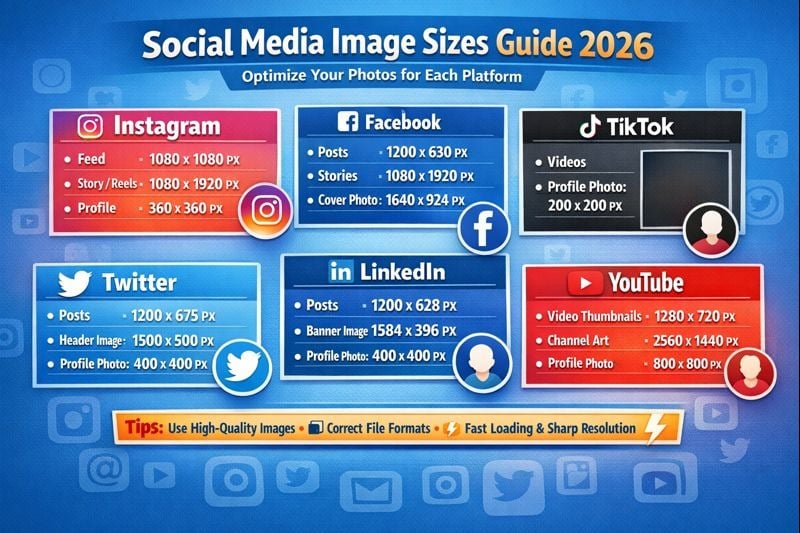
सोशल मीडिया तेज़ी से विकसित हो रहा है, और 2026 तक, विभिन्न प्लेटफ़ॉर्म के लिए images adjust करने का तरीका पहले से कहीं अधिक महत्वपूर्ण हो गया है। चाहे आप अपना personal brand बना रहे influencer हों, कई accounts manage कर रही कंपनी हों, या यादें share करना चाहते private user हों, images को सही तरीके से adjust करना जानना उस content के बीच अंतर बना सकता है जिसे ignore किया जाता है और जो viral हो जाता है। सही image dimensions, file formats, और optimization techniques यह सुनिश्चित करती हैं कि आपके visuals sharp दिखें, जल्दी load हों, और Instagram से लेकर LinkedIn तक हर platform पर आपके audience को engage करें।
2026 में Image Optimization पहले से अधिक क्यों महत्वपूर्ण है
2026 का सोशल मीडिया landscape तेजी से competitive हो गया है। रोज़ाना अरबों posts share होने के साथ, आपके content को तुरंत stand out करना होगा। खराब तरीके से adjusted images धुंधली दिखती हैं, अजीब तरीके से crop हो जाती हैं, या mobile devices पर ठीक से display नहीं होती हैं जहाँ अधिकांश users content consume करते हैं। सोशल मीडिया platforms image quality और loading speeds के बारे में भी अधिक strict हो गए हैं, अक्सर अपने algorithms में oversized या खराब तरीके से optimized files वाली posts को penalize करते हैं।
Businesses के लिए, यह सीधे ROI में translate होता है। एक अच्छी तरह से optimized image तेज़ी से load होती है, users को लंबे समय तक engaged रखती है, और shares और conversions की संभावना बढ़ाती है। Influencers के लिए, professional दिखने वाले visuals credibility बनाते हैं और brand partnerships attract करते हैं। यहां तक कि private users को भी अपनी personal posts पर बेहतर engagement मिलता है जब images ठीक से formatted होती हैं।
Platform-Specific Requirements विकसित हो गई हैं
अब हर social platform की अलग technical requirements और best practices हैं। Instagram Reels और Stories के लिए vertical content को prioritize करता है, जबकि LinkedIn articles के लिए professional horizontal images को prefer करता है। TikTok और emerging platforms ने नए aspect ratios introduce किए हैं जो कुछ साल पहले मौजूद नहीं थे। इन nuances को समझना आपको quality से compromise किए बिना content को efficiently repurpose करने में मदद करता है।
Maximum Impact के लिए Images Adjust करने के आवश्यक Steps
सोशल मीडिया के लिए अपनी images तैयार करने में कई key steps शामिल हैं। इस systematic approach को follow करना हर बार post करते समय consistency और professional results सुनिश्चित करता है।
सही Dimensions से शुरू करें
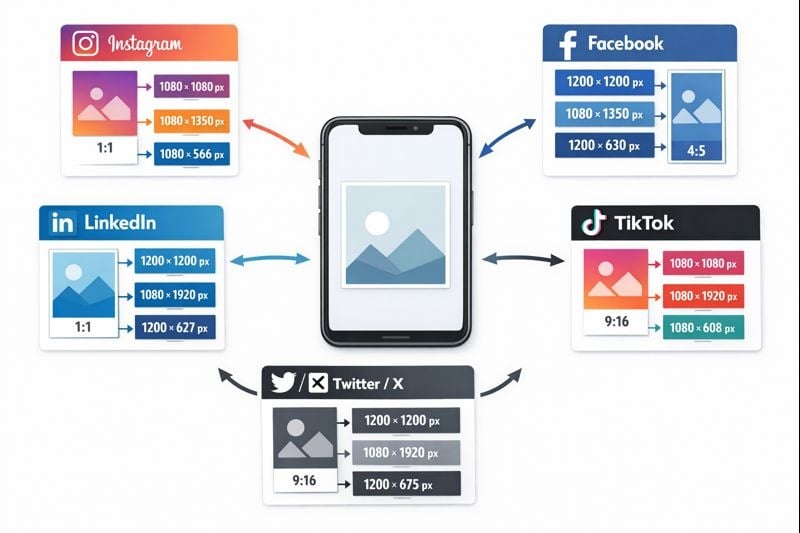
Optimal display के लिए विभिन्न platforms को अलग-अलग dimensions की आवश्यकता होती है। Instagram feed posts 1080x1080 pixels (square) या 1080x1350 pixels (portrait) पर सबसे अच्छा perform करती हैं। Stories और Reels को full-screen vertical viewing के लिए 1080x1920 pixels चाहिए। Facebook cover photos 820x312 pixels होनी चाहिए, जबकि shared link images 1200x630 pixels पर सबसे अच्छी काम करती हैं। Twitter (X) in-stream photos के लिए 1600x900 pixels recommend करता है, और LinkedIn shared content के लिए 1200x627 pixels prefer करता है।
हर platform के लिए manually अलग-अलग images बनाने के बजाय, smart content creators templates या automation tools का उपयोग करते हैं जो एक साथ कई formats में images adjust करते हैं। यह channels पर consistency बनाए रखते हुए घंटों के repetitive काम को बचाता है।
Quality से समझौता किए बिना File Size Optimize करें
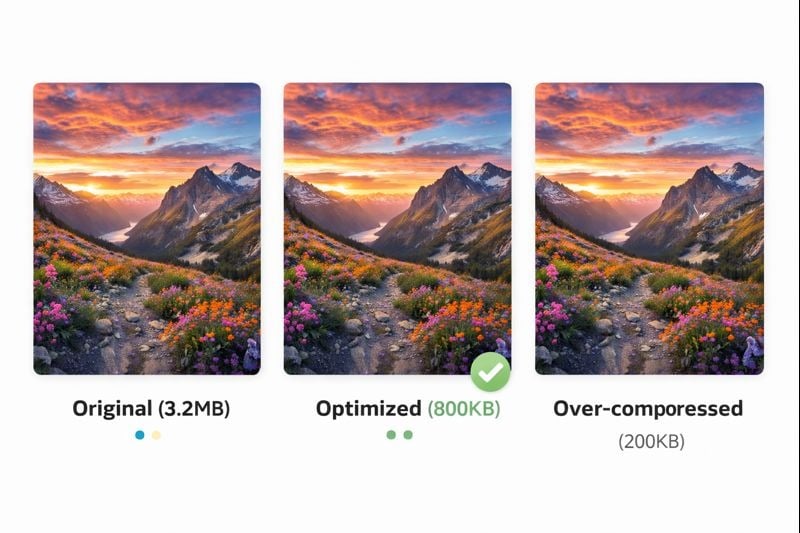
बड़ी image files loading times को slow कर देती हैं, जो engagement को नुकसान पहुंचाता है और platform penalties trigger कर सकता है। लक्ष्य visual quality को high रखते हुए file size को reduce करना है। Modern compression techniques बिना noticeable quality loss के files को 60-80% तक reduce कर सकती हैं।
अधिकांश सोशल मीडिया content के लिए, 1MB से कम file sizes का लक्ष्य रखें। JPEG format लगभग 80-85% compression levels के साथ photographs के लिए अच्छा काम करता है। PNG text या transparent backgrounds वाले graphics के लिए बेहतर है, हालांकि files बड़ी होती हैं। WebP ने superior compression offer करने के कारण popularity हासिल की है, लेकिन पहले platform compatibility check करें।
Mobile-First Design पर विचार करें
85% से अधिक सोशल मीडिया users मुख्य रूप से mobile devices के माध्यम से platforms access करते हैं। जब आप images adjust करते हैं, तो उन्हें smartphone screen पर देखें ताकि यह सुनिश्चित हो सके कि text readable रहे, important elements बहुत छोटे न हों, और overall composition छोटे format में काम करे। Vertical और square formats आमतौर पर mobile पर horizontal landscape images की तुलना में बेहतर perform करते हैं।
विभिन्न User Types के लिए Advanced Techniques
Image optimization के लिए आपका approach आपके goals और technical comfort level से match होना चाहिए। यहां बताया गया है कि विभिन्न users अपने image game को कैसे level up कर सकते हैं।
Influencers के लिए: एक Cohesive Visual Brand बनाना
Influencers को brand recognition बनाने के लिए posts में consistency की आवश्यकता होती है। Preset filters या editing templates बनाएं जिन्हें आप हर image पर apply करते हैं। यह एक signature look बनाता है जिसे followers तुरंत पहचान लेते हैं। जब आप images adjust करते हैं, तो consistent color grading, contrast levels, और composition styles बनाए रखें।
Batch editing tools आपको एक ही settings के साथ एक बार में कई images process करने की अनुमति देते हैं। यह एक सप्ताह के content की तैयारी या एक single shoot से photos edit करते समय अमूल्य है। कई successful influencers हर जगह identical images post करने के बजाय platform-specific content भी बनाते हैं, जिसके लिए resizing और reformatting के लिए efficient workflows की आवश्यकता होती है।
Companies के लिए: Brand Guidelines बनाए रखना
Corporate सोशल मीडिया को हर platform के लिए optimize करते हुए brand guidelines का पालन करने की आवश्यकता होती है। अपने brand colors, fonts, और logo placement के साथ पहले से configured templates बनाएं। यह सुनिश्चित करता है कि हर team member independently काम करते समय भी on-brand content produce करे।
Companies को images adjust करते समय accessibility पर भी विचार करना चाहिए। Visually impaired users के लिए descriptive alt text जोड़ें, readability के लिए sufficient color contrast सुनिश्चित करें, और text-heavy images से बचें जो devices पर अच्छी तरह से translate नहीं होती हैं। Accessibility standards सिर्फ अच्छी practice नहीं हैं; वे आपके potential audience को expand करती हैं और SEO improve करती हैं।
Private Users के लिए: Quick और Easy Solutions
Images को effectively adjust करने के लिए आपको professional software की आवश्यकता नहीं है। कई free mobile apps और online tools सोशल मीडिया के लिए one-click optimization offer करते हैं। ये tools आपके selected platform के आधार पर automatically resize, crop, और compress करते हैं।
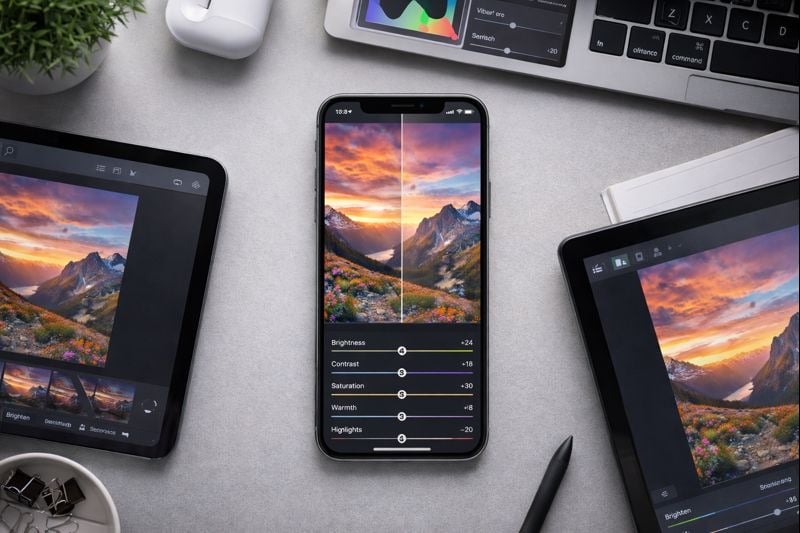
Photos लेते समय अच्छी lighting और composition पर ध्यान दें, जो बाद में heavy editing की आवश्यकता को कम करता है। Images को जल्दी से enhance करने के लिए brightness, contrast, और saturation जैसे basic adjustments सीखें। यहां तक कि simple edits भी advanced skills की आवश्यकता के बिना photos को अधिक engaging बनाती हैं।
मुख्य बातें:
- Awkward cropping से बचने के लिए post करने से पहले हमेशा platform-specific dimensions में images adjust करें
- तेज़ loading और बेहतर algorithm performance के लिए visual quality बनाए रखते हुए files को 1MB से कम compress करें
- Mobile-first approach अपनाएं क्योंकि अधिकांश users smartphones पर content देखते हैं
- कई posts में consistency बनाए रखने और समय बचाने के लिए templates या presets बनाएं
निष्कर्ष
2026 में सोशल मीडिया के लिए images को ठीक से adjust करना सीखना अब optional नहीं रह गया है। यह एक fundamental skill है जो हर platform पर आपके engagement, reach, और overall success को सीधे impact करती है। चाहे आप अपना personal brand craft कर रहे influencer हों, professional standards बनाए रख रही company हों, या life moments share करते private user हों, अपनी images को optimize करने में समय लगाना तुरंत dividends देता है। Proper dimensions और compression की basics से शुरू करें, फिर जैसे-जैसे आप अधिक comfortable होते जाएं, धीरे-धीरे advanced techniques incorporate करें। Platforms और tools विकसित होते रहेंगे, लेकिन image optimization के ये core principles आने वाले वर्षों के लिए relevant रहेंगे।
FAQ
Instagram feed posts के लिए, square images के लिए 1080x1080 pixels या portrait orientation के लिए 1080x1350 pixels का उपयोग करें। Stories और Reels full vertical display के लिए 1080x1920 pixels होनी चाहिए। ये dimensions सुनिश्चित करते हैं कि आपकी images बिना cropping या quality loss के ठीक से display हों।
Compression tools का उपयोग करें जो विशेष रूप से web use के लिए images optimize करते हैं। JPEGs के लिए, compression को 80-85% quality पर set करें। TinyPNG, Squoosh, या photo editing apps में built-in compression जैसे tools minimal visible quality loss के साथ file sizes को 60-80% तक reduce कर सकते हैं। Post करने से पहले हमेशा compressed images का preview करें ताकि यह सुनिश्चित हो सके कि वे अभी भी sharp दिखती हैं।
आदर्श रूप से, हां। हर platform की अलग optimal dimensions और audience expectations हैं। हालांकि, अगर समय सीमित है, तो एक master image बनाएं और इसे विभिन्न platforms के लिए adjust करने के लिए resizing tools का उपयोग करें। कम से कम, awkward cropping से बचने के लिए सुनिश्चित करें कि आपकी image हर platform के लिए dimension requirements को पूरा करती है।
JPEG photographs और कई colors वाली images के लिए सबसे अच्छा है, छोटी file sizes पर अच्छी quality offer करता है। PNG graphics, logos, या transparency की आवश्यकता वाली text वाली images के लिए बेहतर काम करता है। WebP superior compression provide करता है लेकिन पहले platform compatibility check करें। अधिकांश social platforms वैसे भी uploaded images को automatically convert कर देते हैं, इसलिए high quality और appropriate dimensions के साथ शुरू करने पर ध्यान दें।
नहीं, कई free tools सोशल मीडिया image optimization के लिए बेहतरीन काम करते हैं। Canva, Snapseed, और VSCO जैसे mobile apps powerful editing और resizing features offer करते हैं। Pixlr और Photopea जैसे online tools बिना downloads के browser-based editing provide करते हैं। ये free options अधिकांश users, influencers, और यहां तक कि small businesses के लिए सभी basic needs को cover करते हैं।